 I went out and bought a zune last Tuesday, so I want to give my review to all of you guys and hopefully this will help you decide if you want one or not based on what you need. I just wanna let you all know where I’m coming from, I have owned 3 different iPods, I have owned a Photo iPod, iPod Nano and a iPod Shuffle along with screwing around with a iPod Video, so I know what an mp3 player should be like because Apple has always done that well.
I bought a Zune mainly for the way its suppose to integrate into the Xbox 360, since after all I do publish a video game podcast. I’ll be up front with you, it’s probably the most compelling reason for me, that and the Wi-FI fuctions. Now what I’m going to do is first share my experience purchasing the Zune, then give my initial impressions of it and finally wrap it up with a good-bad-and-needs-improved summary. Ready? Here we go…
On Tuesday I picked this up at Target because they were having a deal where if you buy it you get a free $25 gift card which is a better deal then anywhere else I could find. I was a little disappointed in the opening day specials that were offered with the Zune. I figured MS would have done more promotions or specials, being that they are competing with Apple on one of the most corralled markets in all of the technology fields.
They had all three Zune colors that are currently available, brown, white and black. They had a “dummy” black model on display along with a working brown edition, no previews on the white one though. I wanted to see them both before I made my decision but they would not let me see the white models because they were boxed and Target didn’t wanna open the box for me.  I picked the black model. To me the black looked a little better when watching the videos on the demo at that time, it blended better for me.
So I get home with it and unbox it. It was packed pretty well and not cluttered up at all. Simple and clean is always good, that’s one of the reasons the iPod is so successful. Now I read some reviews about the install crashing. So with that in mind, I get the install CD, put it in my computer and had no problems with crashing, not single one. But wow it is slow!  Granted my computer is not top of the line but it is a good computer and has more then enough speed and memory. But still, the install took a good 20 minutes at least, counting the update as well that were available.
Now I have it installed on my computer and now its another 20 minutes while its searching for music, videos and pictures, this kinda bogs down the excitement. Alright! Finally done with that waiting.  I plug in my Zune to my computer, it finds it just fine and its auto syncing up. Nice! But damn, its taking a long time again!  And this is USB 2.0. Maybe it has something to do with the countless Gigs of music and videos I have on my computer ?-). The cool thing about syncing up the videos is that it automatically converts them over to the Zune format as long as it’s compatible with the Zune format.  The conversion times are also very slow, but that must be the sacrafice for getting such small file sizes.
Lets start talking about using the Zune. It’s laid out nice and simple. You have a click wheel in the middle with a back button on the left and a play/pause button on the right. Now as for as the click wheel, I guess I am too used to the iPod because I kept trying to scroll with it and that just does not happen. It is not touch sensitive, a key design feature that will throw off experienced iPod users. Once you get used to the the fact that you can not scroll with the wheel, the whole navigation on the Zune will become very simple. Very very simple. Highly intuitive on MS’s part with the menus, I picked up on it in seconds.
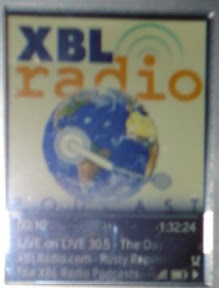
Now for things that I have tried out. Music.  Very simple, it lists all your music here, grouped by songs, genres, albums, artists, and playlists. You go to the song, artist, genre, etc. that you want, select it and select “play now” or just click the play button, that simple. It then shows your album art along with a time bar and it all looks great, better then the iPod. So since I now have it playing music, I could click the center of the wheel and get the options to rate the song, flag it, shuffle, repeat and the coolest innovative option, to send the song via Wi-Fi.
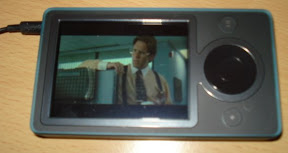
So next we have videos, they have they own type of grouping too, I can not recall it though and I can not see them because I deleted the videos that came prestocked on the Zune so I forgot the groups, sorry. But lets get into the videos, like I said before, the software automatically coverts the videos for your Zune when you sync it up as long as it compatible, which not everything is. WMV’s, MP4’s, and H.264’s work, everything else does not. Mov’s, Avi’s and everything else does not work right now, maybe later but right now they do not and this to me is a huge thing not to include. When you play the videos the layout changes a little, you have to rotate it sideways because the Zune goes to widescreen. The screen and picture resolution is awesome, the videos are crisp, bright and look great. If you click the center wheel here you get the description of the video, however it was tagged. You do not have an option to send videos like you did with music but word is that its coming so stay tuned.
Pictures now, just like the others same thing, they are grouped by folder or by date. The Zune rotates them automatically based on how it sees fit, and if you click the center wheel you have the option to send, shuffle, zoom, tag and apply as background, which I think is great, you get to have your own personalized background on the Zune which is a cool feature.
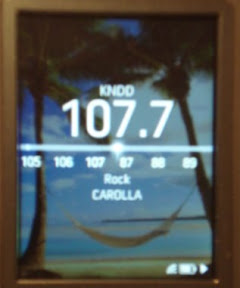
Moving on to the radio aspect of it now. As you have probably heard, the Zune comes with a integrated FM tuner. This is a cool extra kicker for me. I did not need it but I am glad that its there. You use the wheel to seek, and hold it down to set presets. The reception seems pretty good and it also includes RDS features which allows the radio stations to tag whats playing with song artist, titles, etc. I have heard rumors that you can flag songs you hear on the radio with the Zune for purchase later if you like it but as of right now its not a feature. I hope that this option will come our way because quite often while I’m listening to the radio and I hear a song that I like but do not have, this is give me the option to get it later.

We also have a community menu on the Zune that is suppose to show you everyone with a Zune around you, there Zunetag and what there doing, ie listen to music, watching a video along with what they are listening to or watching but I have no one around me to test it on so I am unable to try that mode out.
Now for the good, bad and needs some work.
Good: Video quality is awesome, the screen is really nice and big, navigation is simple, FM tuner is great and having Wi-Fi should be awesome once you take off the chasity belt on it and let it be free from restrictions.
Bad: Oh the crappy software, its so damn slow and bogs my computer down. Why do I have to install your crappy software anyways on that? You (MS) just released the new Windows Media player which I love so far, it also has a nice music store with the urge, so why can I not just use that? No podcast integration? Who the hell screwed that up? Fire them now, huge blunder. Where is the Xbox integration that we were told about? It better be coming soon.
Needs improved: Wi-Fi, don’t lock it down, let it be free, let the user use it however they want, ie download music, sending videos and sharing music without drm if they own the rights to it, none of the 3*3 deal. I should be able to share my podcast through Wi-Fi to everyone that wants it and they should not have to worry about listening to it in 3 days. Fast forwarding through songs, have it so when you hold down the fast forward button it speeds up, it takes way to long to fast forward though a podcast if I wanna get to the end. Allow tagging of songs that you hear on the radio. Allow more video support and provide video downloads through the Zune software.
Overall I am pretty happy that I bought one, it a pretty cool device. Now would I recommend you guys to buy one? That all depends on your situation, do you need a mp3 player? Do you already have one? And what features are you looking for? If you already have and iPod I say keep your iPod for right now. Right now you can not really do anything extra with the Zune compared to the iPod. If you do not have an mp3 player and want to get one I would really recommend the Zune, especially if your a 360 gamer because of the integration that will be coming our way.